Implementing Adaptive Agentic in Production with RAISE (Part 2)
 Antoine Habert
Understanding Adaptive Agentic Systems
Agentic AI is everywhere. We talk about it, we build it, we sell it. But between impressive demos and systems that hold up in production, there's a chasm that few cross.
This three-part series explores this chasm and how to bridge it.
Part 1 - Agentic That "Almost Works" Doesn't Work
We lay the conceptual foundations. Why current agentic systems struggle to move from POC to production, what systematic pitfalls exist, and what principles to build on to avoid them. The problem isn't that they crash—it's that they work "sort of," and to reach production, they don't achieve the required level of reliability. Most importantly, we don't know how to improve them because we haven't equipped the system for that from the start.
Part 2 - Adaptive Agentic: Principles of AI That Grows
We move to the vision. The principles of adaptive agentic systems, how to build systems that don't just execute but observe, learn, and grow. We explore the architectural pillars that make this vision possible.
Part 3 - Implementing Adaptive Agentic in Production with RAISE
→ Part 3a: Architecture, design and operationalization
→ Part 3b: Multi-agent orchestration and dynamic knowledge graph
We move to implementation. How these principles translate concretely into RAISE, the generative AI platform of the SFEIR group. What architectures, design choices, and mechanics to put in place. From concept to operational reality.
Because between being right on paper and running a system in production, there's a whole world. And it's precisely that world we're going to explore.
[Continued from Part 3a]
Governance: who decides what?
A crucial question: who can modify these graphs? The agents, humans, or both?
In RAISE, we've implemented several governance strategies that you can choose based on your maturity level:
Strategy 1: Open learning
All agents can propose modifications to both graphs. You validate everything. This is ideal in the initial phase, when the system is discovering your organization and needs to enrich rapidly.
Strategy 2: Open knowledge, protected mission
Agents can freely enrich the organizational graph (the organization evolves slowly, errors are easy to correct). But only administrators can modify the mission graph (priorities are strategic, we don't want an agent changing objectives).
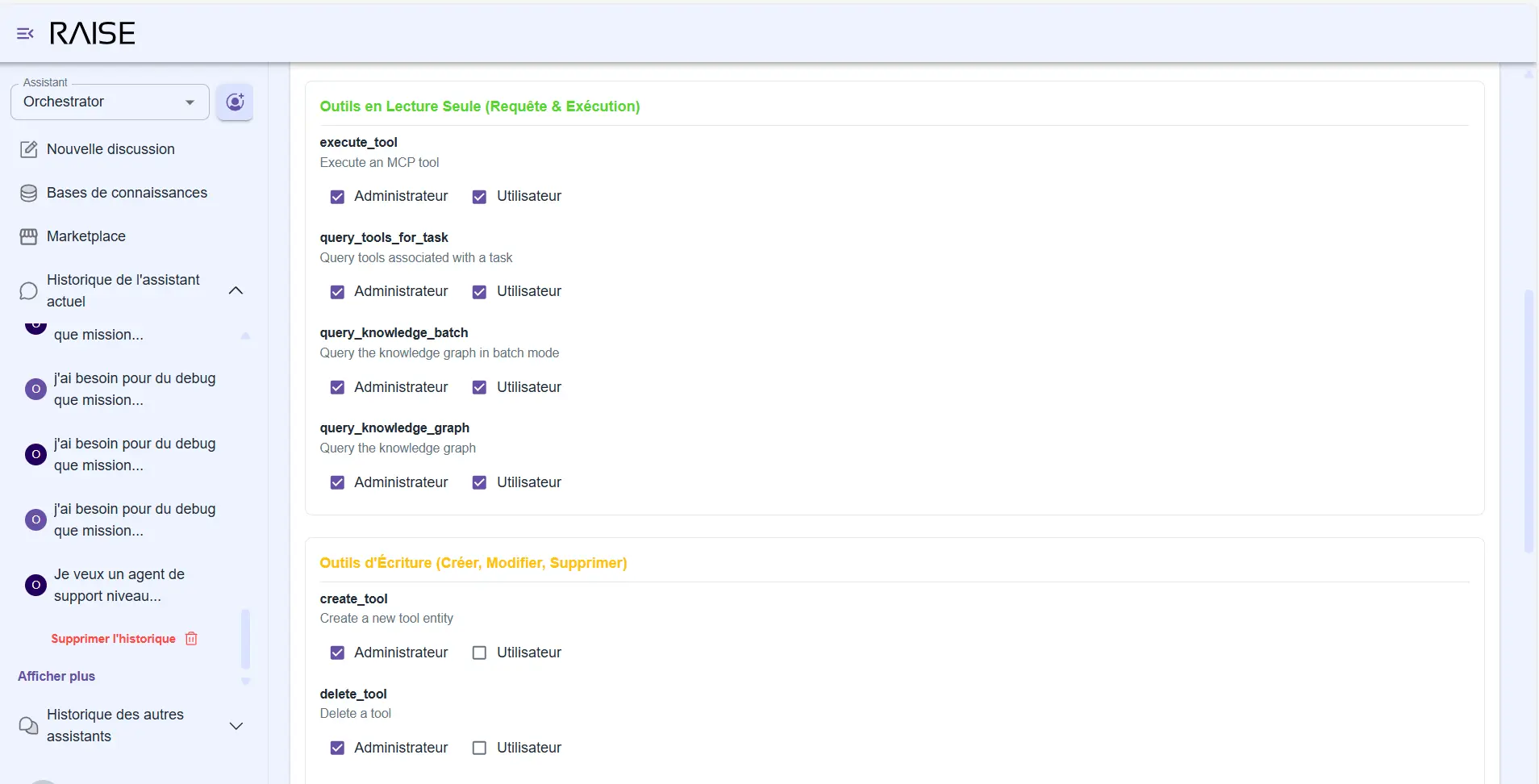
Tool permissions management: distinction between read-only and write tools, with Administrator vs User rights
Strategy 3: Complete lockdown
Graphs are read-only for agents. Only authorized humans can modify them. Useful for highly regulated environments or still immature systems.
Strategy 4: Progressive delegation
The most interesting. Initially, systematic human validation. Then, as the system matures, certain types of modifications become automatic.
Example:
- Adding a new person to the organization chart? → Validation required.
- Updating the status of a completed task? → The agent can do it alone.
- Modifying a strategic priority? → Validation required.
- Adding a technical documentation link? → The agent can do it alone.
This strategy perfectly embodies the principle of "evolving human in the middle": we grow autonomy progressively, according to clear rules.
Dynamic sub-agent calling and generation: invoking what we need
RAISE agents are not just executors. They can use or even create other agents when necessary.
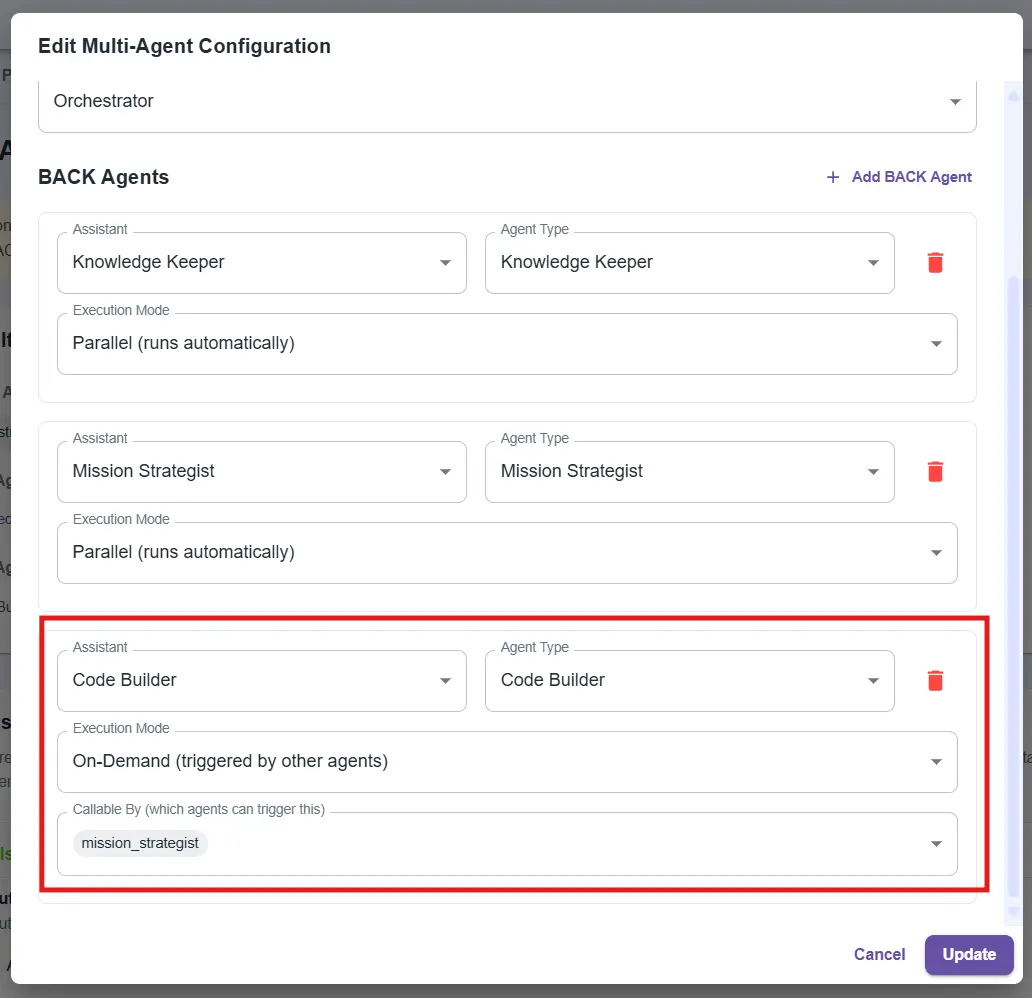
Multi-agent configuration: adding an On-Demand Code Builder agent, callable by the Mission Strategist
How does it work?
Imagine: a user asks you "Can you create a Python script that calculates performance metrics for our CI/CD pipelines?"
The Mission Strategist detects that it shouldn't generate code itself (that's not its role). It then calls a specialized sub-agent: a "Code Builder".
This Code Builder:
- Is configured to generate clean and tested code.
- Has access to necessary tools (file system, test execution).
- Dialogues with the Mission Strategist to obtain missing context.
The dialogue happens behind the scenes:
- Code Builder: "I need to know where pipeline logs are stored."
- Mission Strategist queries the Knowledge Keeper → gets the answer → transmits it.
- Code Builder generates the code, tests it, returns the result.
The Front Agent receives the exchange result and presents it to the user. Mission accomplished. The Code Builder is released.
Why is it powerful?
You avoid two pitfalls:
- Combinatorial explosion: creating all possible agents in advance for all use cases. It's unmanageable.
- Overloaded prompt: making a single agent do everything. The prompt becomes unreadable, quality degrades, errors multiply.
With dynamic generation, you create the agents you need, when you need them, with the necessary context. No more, no less.
Subprompts: contextual instructions on demand
Creating agents that work well poses a major technical challenge: prompt size.
The monolithic prompt problem
An agent like the Mission Strategist needs many instructions:
- How to create entities in the graph.
- Which properties are mandatory.
- How to structure sequential workflows.
- How to manage relationships between tasks.
- How to respond to user questions.
- How to handle errors.
If you put all this in a single prompt, you end up with 1,000 lines of text loaded at each interaction. Result:
- Enormous token cost: you pay to reload the same instructions over and over.
- Loss of relevance: the longer the prompt, the harder it is for the agent to focus on what really matters for the current task.
- Nightmarish maintenance: modifying an instruction requires navigating a massive file.
The solution: modular instructions
In RAISE, we've implemented a subprompts system: modular instruction fragments that the agent loads dynamically based on context.
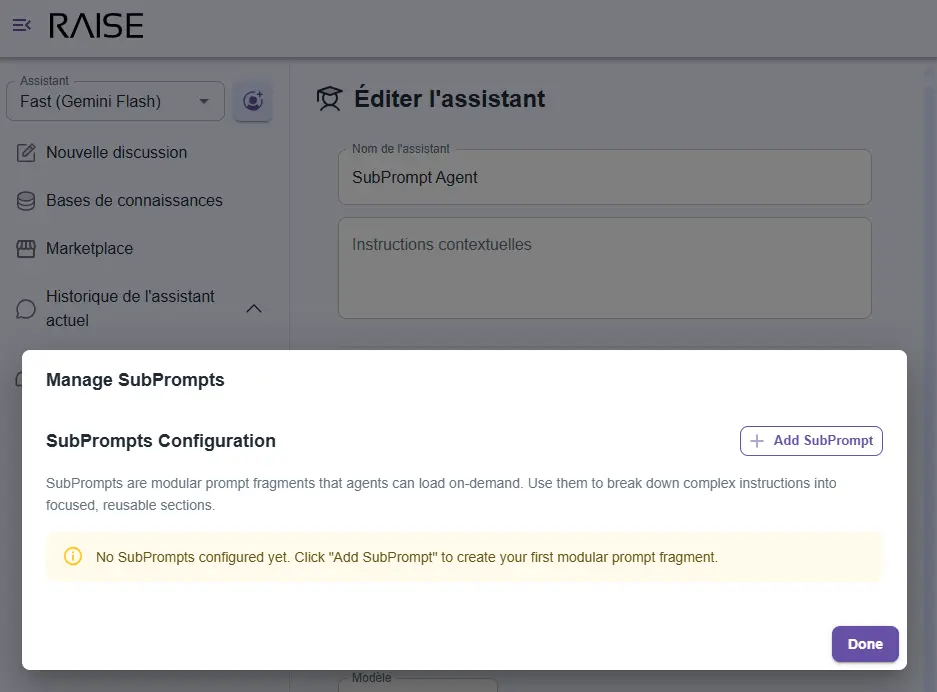
SubPrompts management interface: modular instruction fragments dynamically loaded by agents based on context
Here's how it works:
The agent's main prompt is minimal (about 250 lines). It contains:
- the agent's identity;
- the adaptive system structure (other agents, its role among them);
- available tools;
- available subprompts by category.
Detailed instructions are in subprompts:
entity_creation_rules: all rules for creating entities in the graphworkflow_patterns: sequential workflow patternsquery_optimization: how to efficiently query the graphcross_agent_communication: how to dialogue with other agents
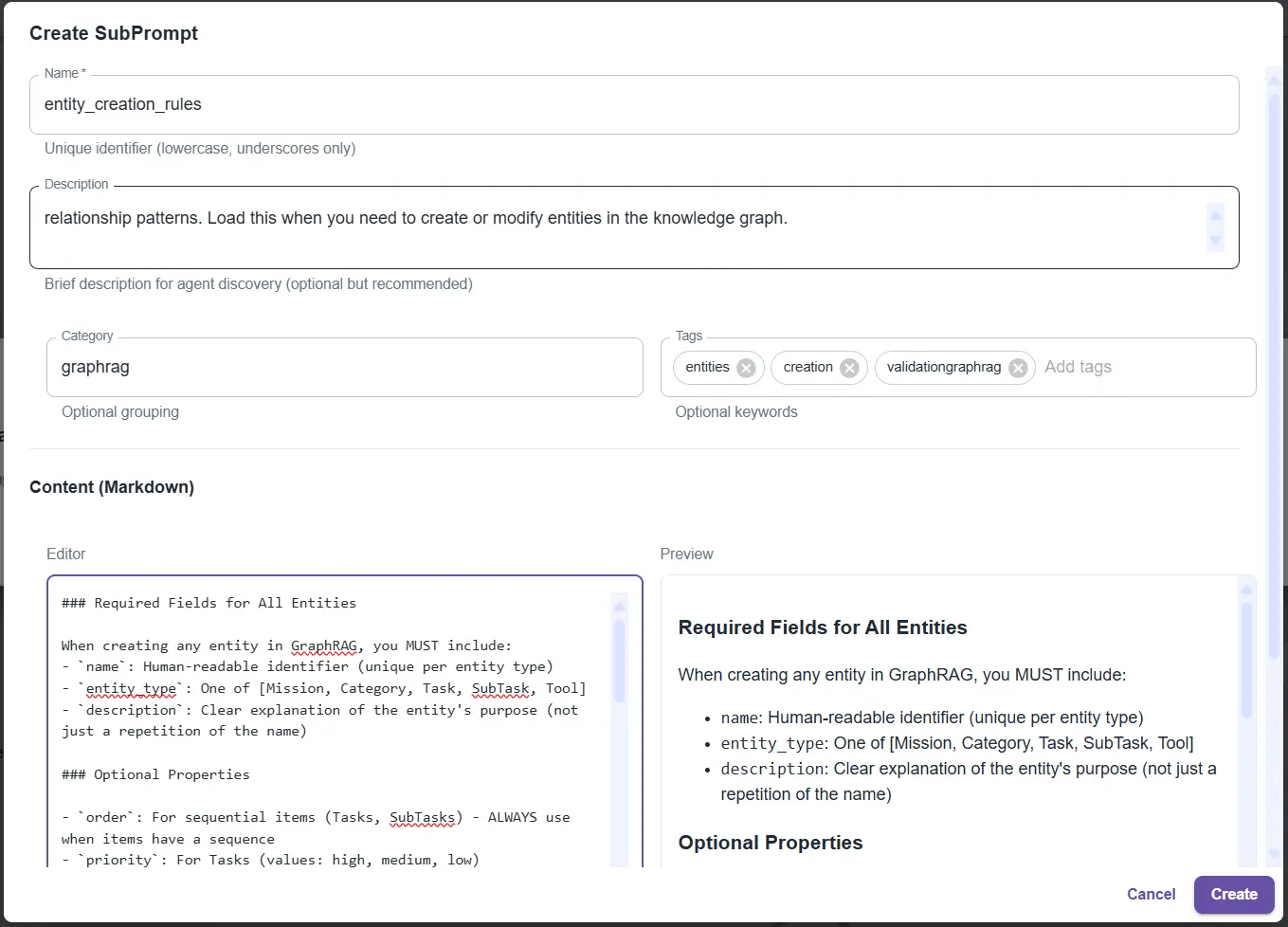
Creating an "entity_creation_rules" SubPrompt: detailed rules for creating entities in the knowledge graph
The agent loads what it needs, when it needs it
Example:
User: "Create a new task in the workflow" Agent thinks: "I need to create entities. Let me load the rules." Agent calls: load_subprompt(name="entity_creation_rules") Subprompt loaded (200 lines of precise instructions) Agent: Now I know exactly how to create this entity! Agent creates the entity correctly, with all required properties.Why it's powerful
- Token economy: instead of loading 1,000 lines each time, we load 250 lines + the 200 relevant lines. Savings: 55% tokens saved.
- Increased reliability: the agent receives exactly the instructions it needs for the current task. No dilution, no confusion. Relevance skyrockets.
- Facilitated maintenance: want to improve entity creation rules? Modify the
entity_creation_rulessubprompt. All agents using it immediately benefit from the improvement. - Reusability: a subprompt can be used by multiple agents. Inter-agent communication rules? Shared among all network agents.
This is one of the key mechanisms that allows RAISE to scale while maintaining high reasoning quality.
The toolbox: extending without rebuilding
For agents to be useful, they must be able to act. Read files, query databases, call APIs, execute code.
In RAISE, we've implemented a dynamic toolbox that allows agents to discover and use tools without you having to reconfigure the entire platform.
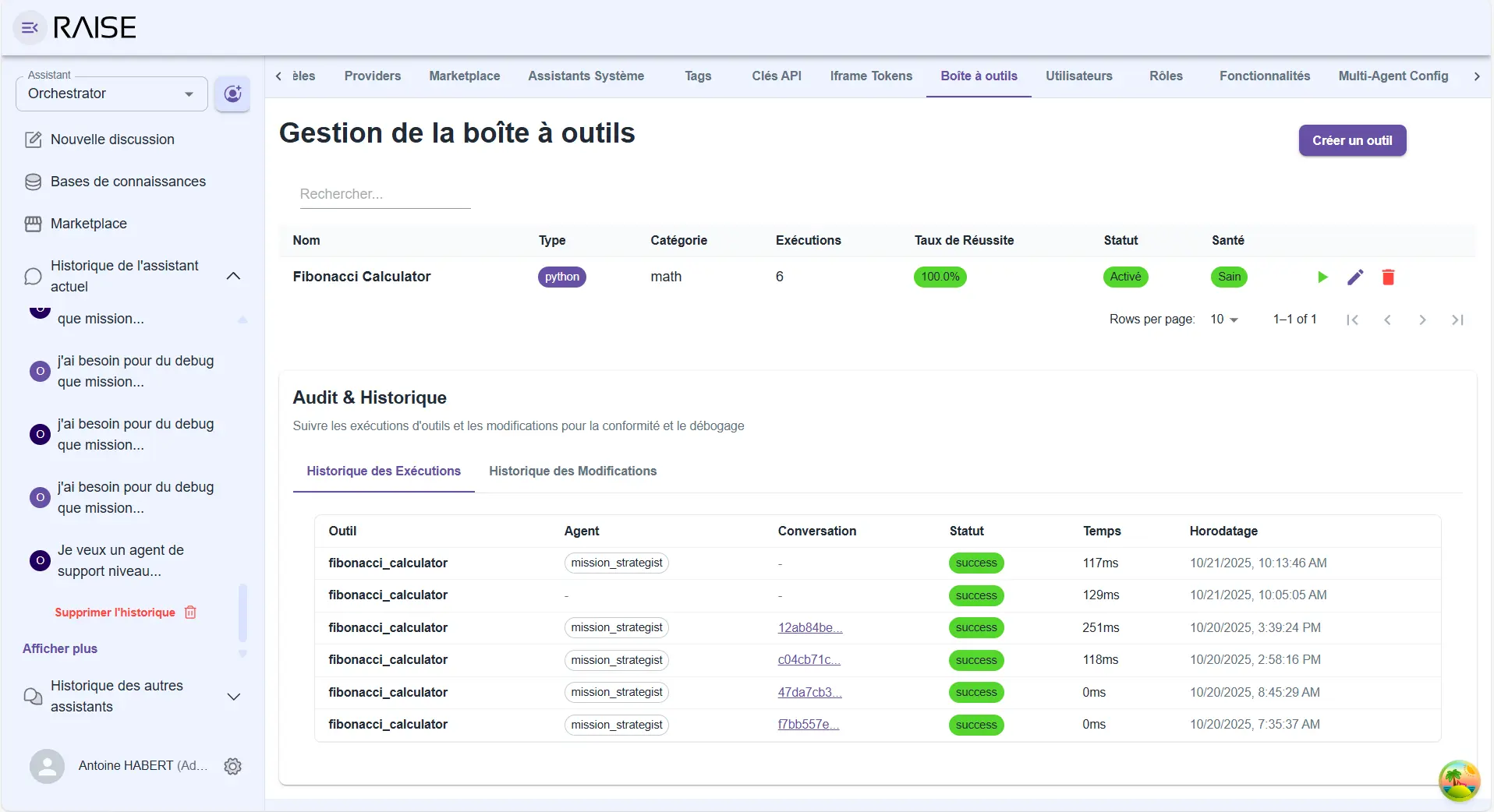
Toolbox: catalog of available tools with execution history and complete audit (Fibonacci Calculator example)
The principle
Tools are functions with clear descriptions. Agents can list available tools, understand what they do, and call them when relevant.
Tool example:
- Name:
get_pipeline_status - Description: "Retrieves the current status of a CI/CD pipeline"
- Parameters:
pipeline_id(pipeline identifier) - Result: Status, last execution, success rate
The agent sees this tool, understands it can use it to answer "How is pipeline X doing?", and calls it with the right parameter.
Extensibility
Want to connect RAISE to your ticketing system? Create a create_ticket tool. Want to query your Elasticsearch? Create a search_logs tool. Want to integrate an external service? Create a gateway tool.
Tools are added without touching RAISE's core. Agents discover them automatically, learn to use them. The system extends naturally.
External connection
These tools can be:
- simple local functions;
- gateways to external APIs;
- connectors to standard protocols (MCP - Model Context Protocol).
The agent doesn't see the difference. It calls a tool, gets a result. Complexity is hidden.
The observability agent: the system watching itself
We've talked about self-observability (each agent observes its own reasoning). But there's a level above: observing the system as a whole.
This is the role of the observability agent.
A dedicated interface
This agent is not in the normal conversational flow. It has its own interface that combines two dimensions:
1) The conversation: you dialogue with the observability agent like any assistant. But its responses are anchored in the system's real data.
You ask questions:
- "Why did this thread go wrong?"
- "What improvements do you suggest for the Knowledge Keeper?"
- "Show me cases where self-evaluation is below 5."
- "Compare performance before and after the prompt change."
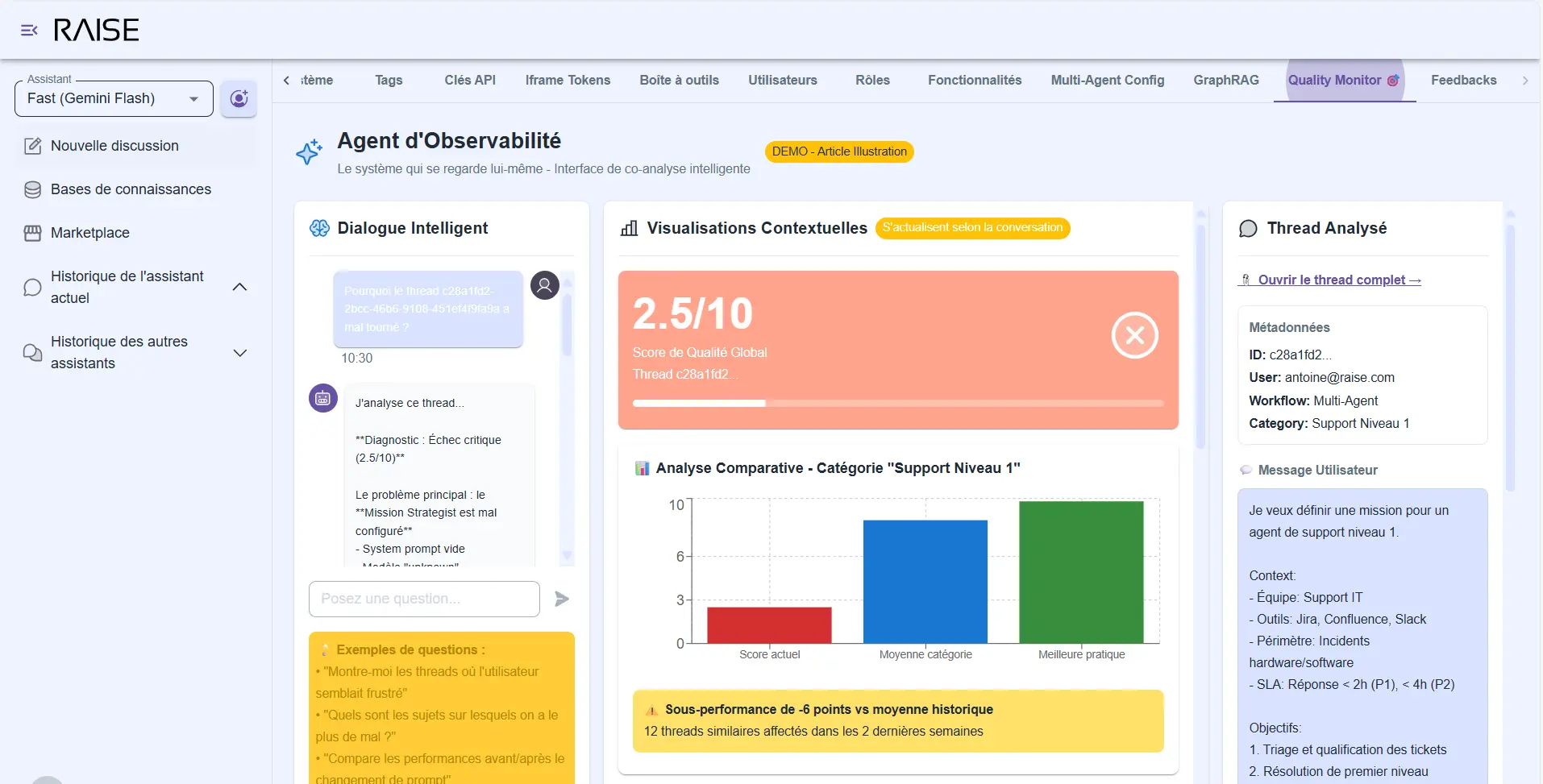
Observability Agent: intelligent dialogue with contextual visualizations (score 2.5/10, comparative analysis, underperformance detection)
2) Visualizations: in parallel, the interface displays dashboards that update according to your conversation context.
When you ask "analyze this thread", graphs focus on that thread: confidence evolution, detected mood, response time, tools used. When you ask "compare the two versions", curves show before/after: success rate, number of clarifications requested, user satisfaction.
It's this combination that makes the difference. You're not stuck between "reading raw logs" and "consulting generic dashboards". You have an intelligent conversation enriched with relevant visual data.
What it detects
Problematic patterns:
- "The agent asks for clarifications too often on this type of query" → Graph showing frequency over the last 30 days.
- "Self-evaluation score is systematically low when the user asks for X" → List of affected threads.
- "The Mission Strategist doesn't find information in 30% of cases on this project" → Map of missing areas.
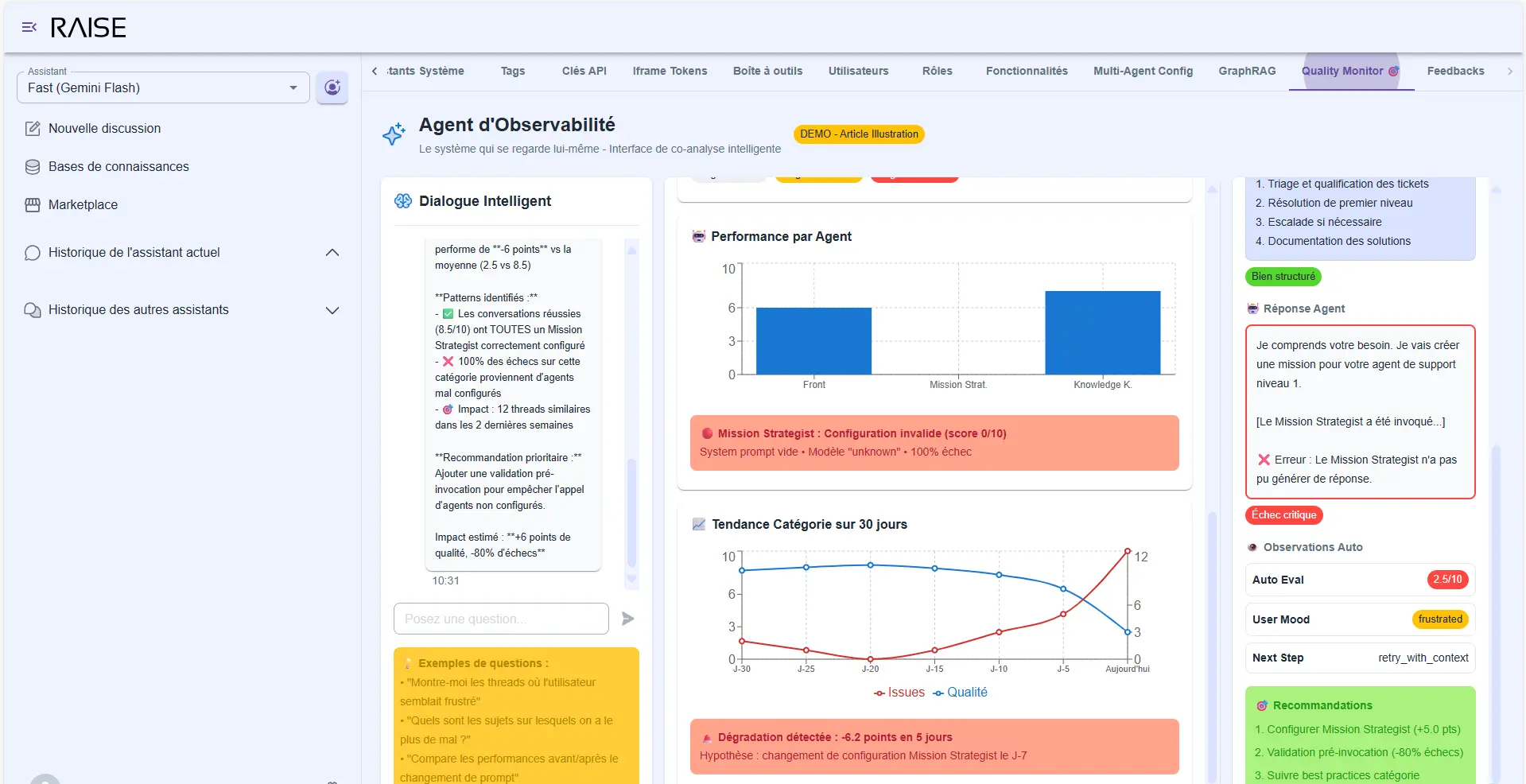
Advanced diagnostics: performance by agent, Mission Strategist error detected, category trend over 30 days
Improvement suggestions:
- "The Front Agent's prompt lacks guidance on when to delegate to Mission Strategist. Adding this clarification should reduce back-and-forth by 40% (based on analysis of 150 similar threads)."
- "The Knowledge Keeper Graph lacks information on team X. In 12 recent threads, the agent had to ask the user for this information."
Each suggestion is accompanied by data: how many threads are impacted, what is the problem's magnitude, what would be the estimated impact of a change.
Real-time anomalies: if quality suddenly drops, the observability agent immediately alerts you:
- The moment of degradation (annotated timeline).
- Affected threads (clickable for analysis).
- Hypotheses of causes (prompt change? new type of query?).
- Impact metrics (how many users affected, what quality loss).
You don't discover problems three weeks later. You see them in real time, with context to act quickly.
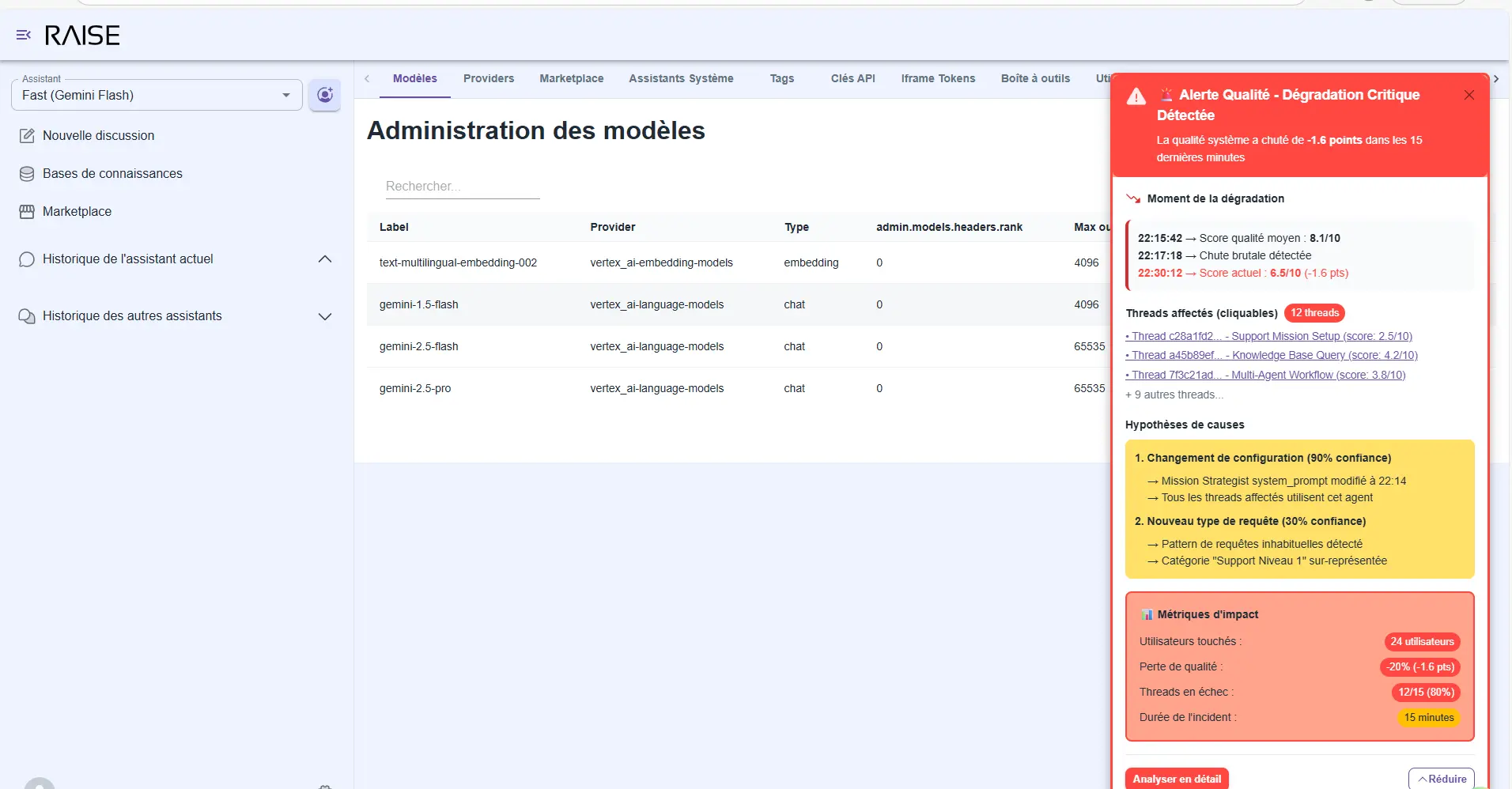
Real-time alerts: critical degradation detected with cause hypotheses, impact metrics, and 12 affected threads identified
Free exploration
You can also explore without a specific question:
- "Show me all threads where the user seemed frustrated."
- "What topics do we struggle with the most?"
- "Analyze the system's evolution since the beginning of the month."
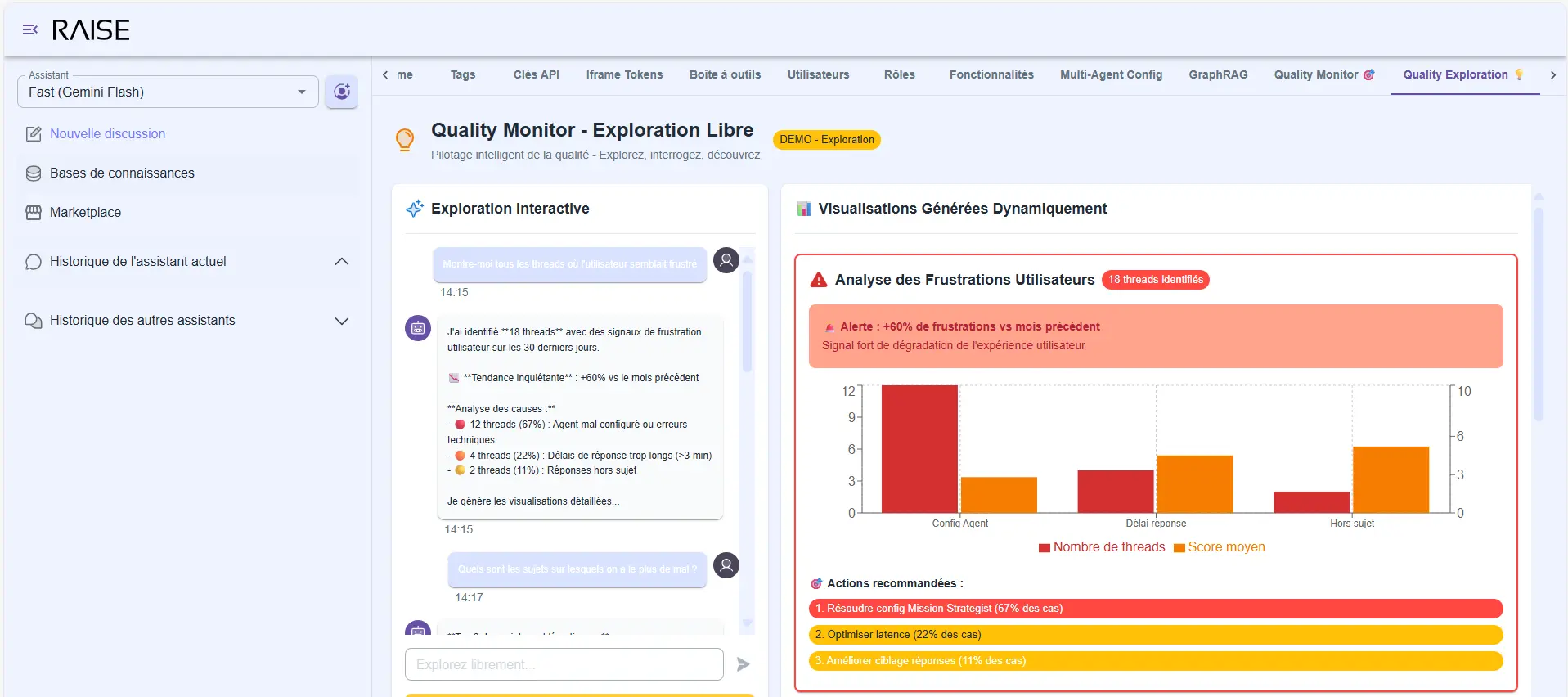
Quality Monitor - Free Exploration: user frustration analysis (+80% vs previous month) with identified causes and recommendations
The agent generates relevant visualizations, comments on trends, draws your attention to important signals.
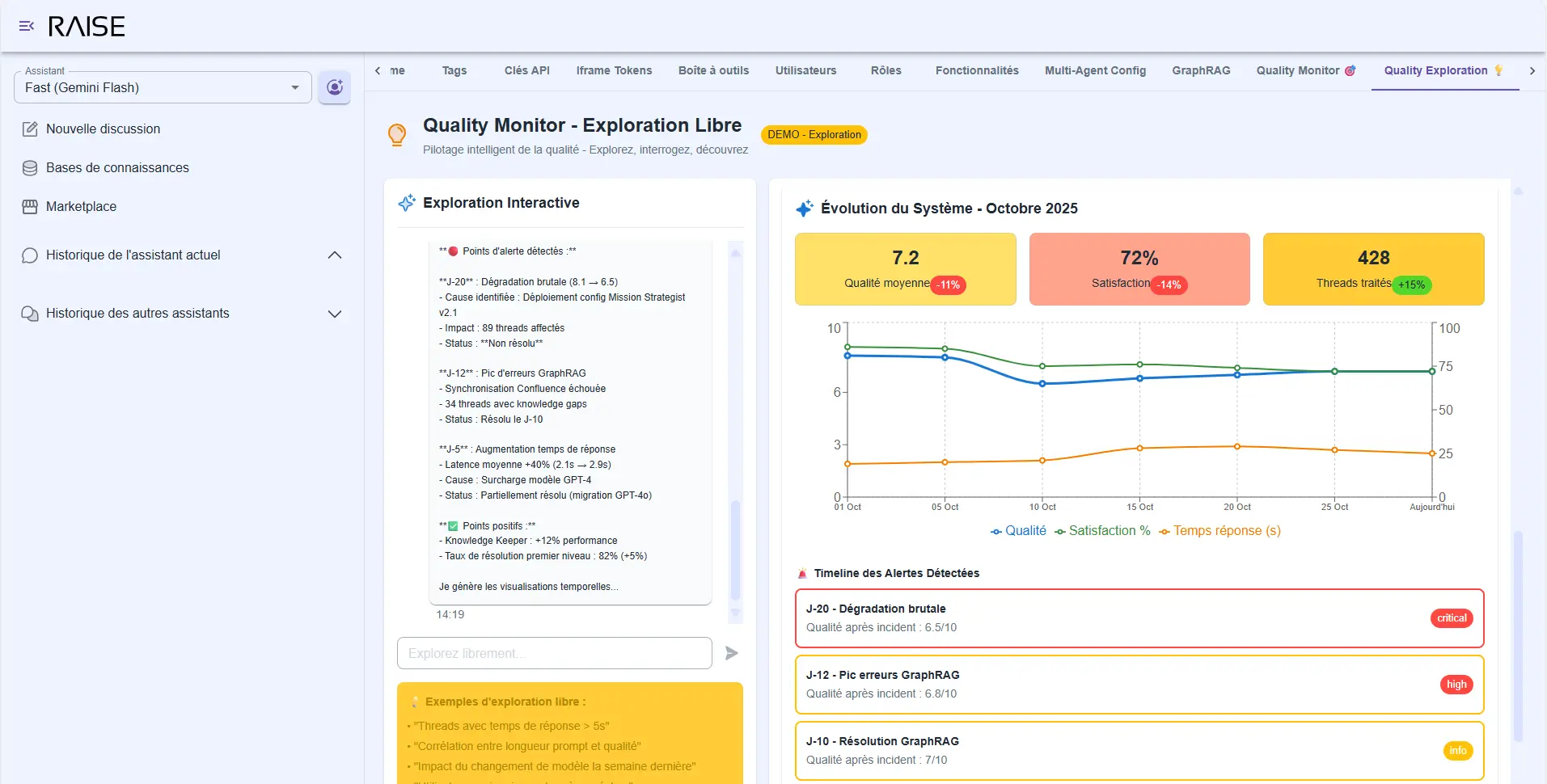
System Evolution - October 2025: average quality 7.2/10, satisfaction 72%, 428 threads processed with timeline of detected alerts
This is the intelligent quality monitoring we talked about in the second article of our series implemented and operational. Not just metrics in a corner. True co-analysis between you and the system.
Conclusion: the conditions of reliability
We've come full circle. From observing the limitations of current agentic systems (Part 1), to the vision of adaptive agentic (Part 2), to its implementation in RAISE (Part 3).
What we've built are not demos that impress in meetings. These are operational features that hold up in production:
✅ Systematic observability: each agent exposes its reasoning, confidence, plan. We no longer navigate blindly.
✅ Structured cognitive foundation: the three pillars (user context, mission, information) embodied in specialized graphs that evolve with the organization.
✅ Cooperative multi-agent architecture: agents that reason in parallel, merge their contributions, dialogue with each other. Not an API cascade, but true cognitive collaboration.
✅ Flexible governance: graph protection strategies that adapt to maturity level. Humans remain in the loop at the right level.
✅ Controlled extensibility: dynamic sub-agent generation, evolving toolbox, coherent architecture. The system grows without collapsing under its own complexity.
✅ Intelligent quality monitoring: an observability agent that analyzes, suggests, alerts. Continuous improvement is integrated into the system.
The conditions of reliability are not a mystery. They're here, implemented, tested, ready to be deployed.
Agentic that "almost works" doesn't work. But adaptive agentic holds up in production. Because we've given it the conditions to grow.
What's next?
RAISE is not an end in itself. It's a platform, an accelerator, fertile ground.
What we've just presented are the foundations. The basic features that allow building reliable agentic systems.
But the real game starts now: concrete applications.
We're currently working on sector-specific applications that leverage these foundations:
AI4Ops: adaptive agentic for operations
- Proactive incident detection.
- Automated root cause analysis.
- Infrastructure optimization recommendations.
- Dynamic runbook generation.
AI4HR: adaptive agentic for human resources
- Recruitment assistant that understands culture and needs.
- Satisfaction analysis and weak signal detection.
- Personalized training recommendations.
- Internal mobility facilitation.
These applications are not disposable POCs. They're operational systems that inherit all of RAISE's robustness: hexagonal architecture, "secureGPT" / "enterprise ready", no vendor locking, integration with models from all providers, coupled with all these additions: observability, knowledge graphs, multi-agents, adaptive dynamic workflows, governance, and quality monitoring.
We'll present them soon, with real use cases, production metrics, field experience feedback.
Because ultimately, that's where it all happens: in the ability to hold up over time, to adapt to unforeseen cases, to grow with the organization.
Adaptive agentic is not a promise. It's an operational reality.
And it's just beginning.
Continue Your Exploration
Discover other articles in the Adaptive Agentic Systems cluster within the AI universe